Look This Way: Building a Cursor-Gaze Portrait From Camera to Canvas
2026-11-25
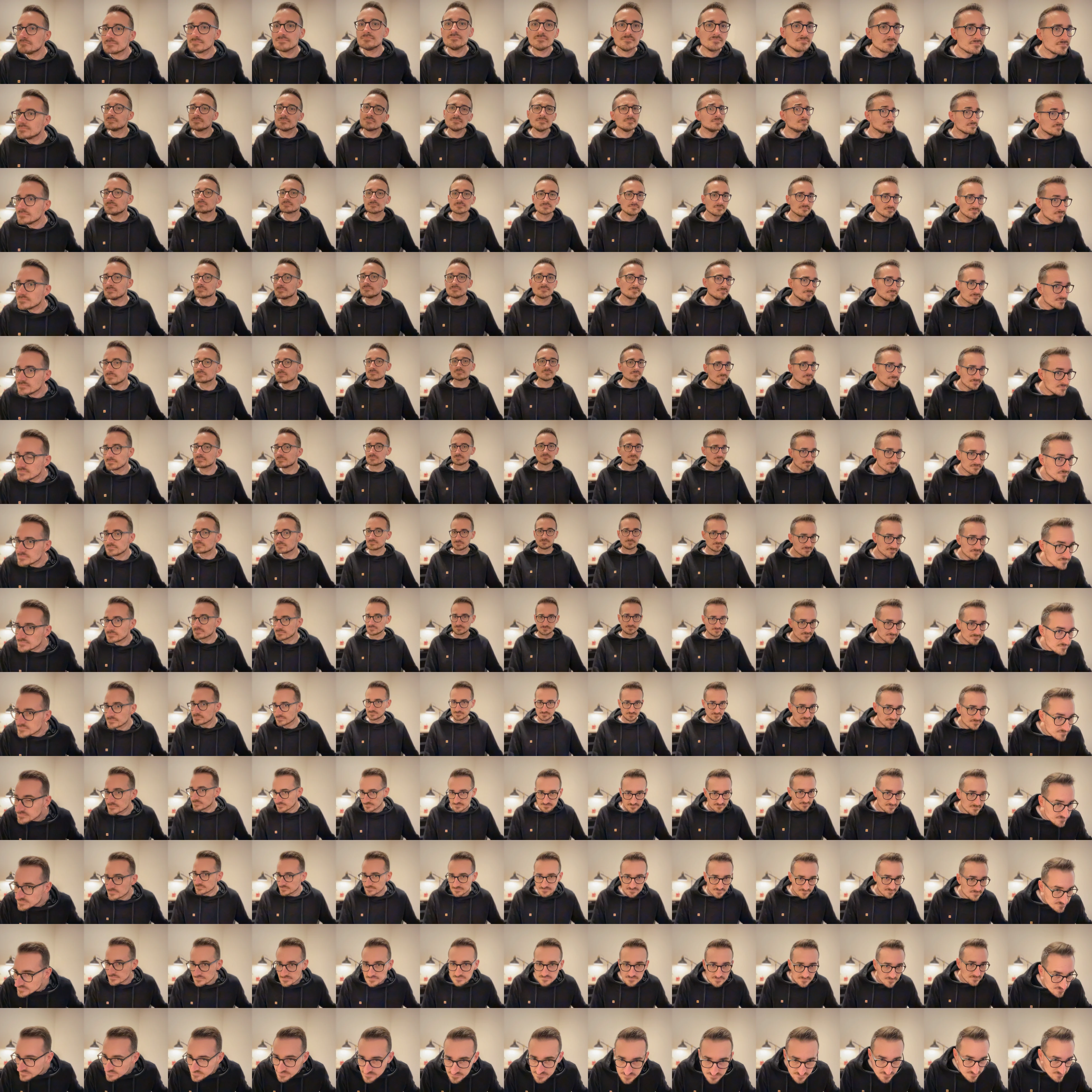
This is what I built
Move your cursor around the page to change the portrait’s gaze.
I wanted the portfolio hero to do a little more than hold a nice photo. The idea was simple: make a portrait that looks back at you as you move around the page.
The result is the interactive portrait above. It is not video, and it is not a face-tracking filter. It is a deliberately small collection of photographs, captured in advance and arranged as a sprite sheet. The browser picks the right frame as the pointer moves, which makes the portrait feel present without turning the homepage into a heavy production.
The starting point: a portrait needs more than one pose
A normal headshot has one point of view. To make it respond, I needed a library of subtle eye and head directions: up-left, straight ahead, down-right, and everything between.
That could have meant manually photographing and naming dozens of files. Instead, I built the capture workflow around Cursor Gaze, a small local capture studio and React canvas component created specifically for the job.
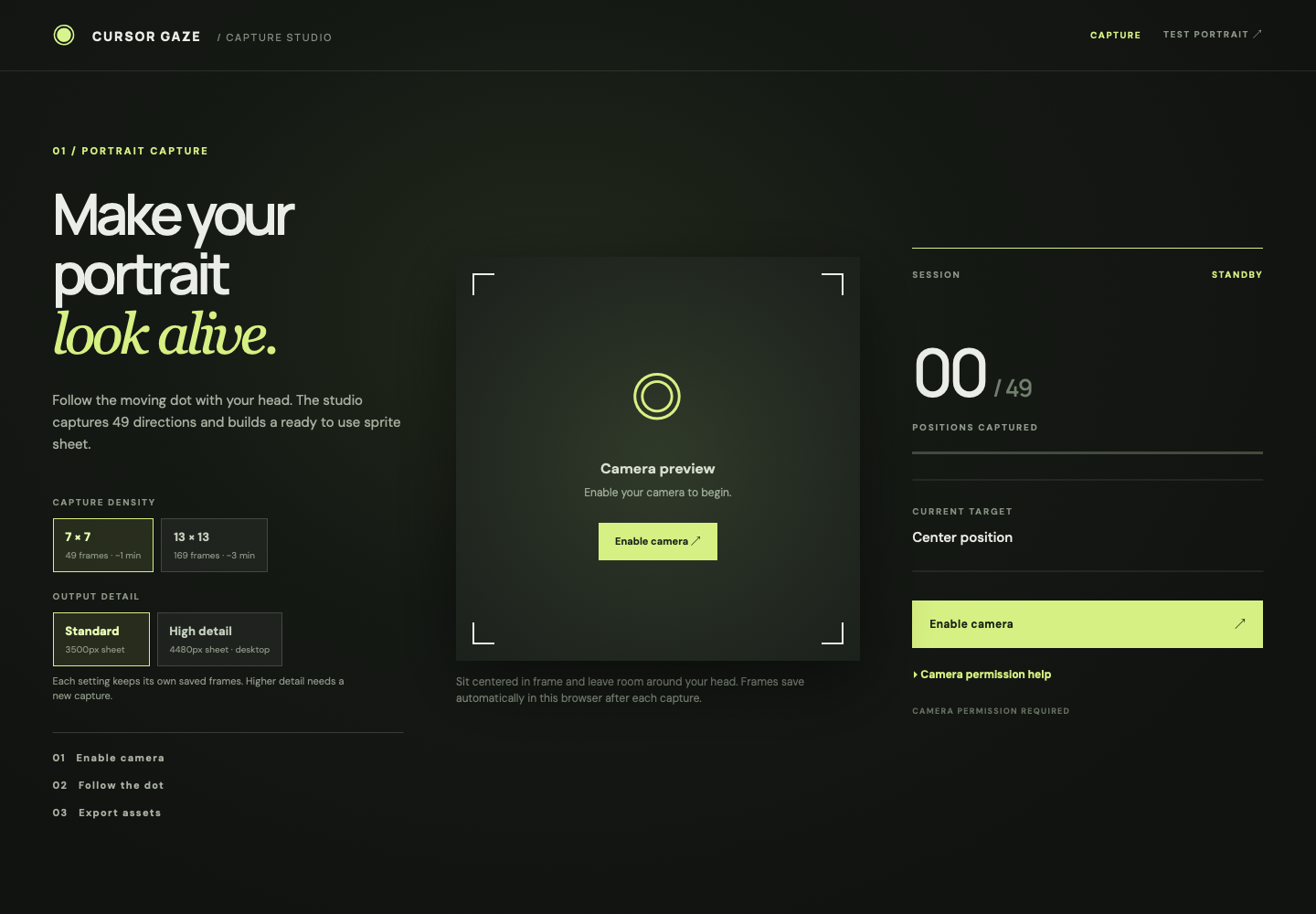
Building the capture studio
The capture tool turns a webcam session into a consistent grid of portrait frames. You choose a 7 × 7 grid for a quick pass or a denser 13 × 13 grid for smoother directional changes. I used the 13 × 13 option here, so the finished sheet contains 169 frames.
After a short countdown, a target moves through a spiral path across the camera preview. I followed it with my eyes and head while the tool paused at each point and captured a frame. The preview is mirrored, just like a front-facing camera, so looking toward the target produces the direction viewers expect on the page.
The capture process is intentionally practical:
- Frames are saved to IndexedDB as the session runs, so a paused capture can be resumed after a refresh.
- Each grid size and output-detail setting keeps its own saved session.
- Any weak frame can be retaken before export instead of restarting the whole session.
- Export produces two files: the sprite sheet and a compact JSON manifest describing its grid and dimensions.
For this portrait, the tool exported a 3900 × 3900 WebP sheet: 13 columns and 13 rows, with 300 × 300 pixel frames. The sheet at the top of this post is the actual asset the component reads.
From capture to component
The runtime side is deliberately separate from the camera tool. The portfolio only needs the exported WebP and its manifest, which live together under public/portrait. It does not ship camera controls, capture state, or any of the studio code to visitors.
At runtime, the React component loads the manifest, verifies that the image dimensions match it, and decodes the sprite image once. A <canvas> then draws just one 300 × 300 frame at a time.
When the pointer moves, the component maps its position to a normalized X/Y value. With the default portrait tracking mode, the portrait’s own center is neutral gaze. Moving left of the portrait selects left-looking frames; moving above it selects upward-looking frames. The mapping recalculates on scroll and resize, so the interaction stays natural wherever the portrait appears in the layout.
There are a few useful details doing quiet work behind the scenes:
requestAnimationFramesmooths the movement without putting pointer position into React state every frame.ResizeObserverkeeps the canvas crisp at its rendered size, including on high-density displays.- The default renderer uses nearest-frame selection for a clean, photographic result. A bilinear mode exists for experiments, but blending adjacent photos made this particular portrait look ghosty.
- Reduced-motion and touch-only visitors get the centered frame instead of an interaction that does not fit their device.
Bringing it into the portfolio
Once the capture was exported, integrating it was pleasantly boring: copy the component and its shared grid helpers into the Next.js project, drop in the two static assets, and give the canvas a home in the hero.
That is one of the reasons the Cursor Gaze project was so helpful. It handles the fiddly parts that are easy to get subtly wrong: the capture path, frame persistence, sprite dimensions, manifest validation, pointer normalization, canvas scaling, and accessible motion fallbacks. The portfolio stays focused on presentation while the plugin-like capture tool owns the making of the asset.
What I learned
The best part of the experiment is that it feels custom without requiring a giant dependency or a backend service. It is still just a static site, a WebP, a JSON file, and a focused canvas component.
The first version taught me that the quality of the capture matters as much as the code. Consistent lighting, a centered position, a bit of space around the head, and a dense enough grid make the gaze read as intentional. The capture studio made it possible to iterate on those physical details without turning the technical side into a pile of manual file management.
The original static portrait is back in the homepage hero now, but the cursor-gaze version has a better home here: a small, hands-on case study where you can try the result, inspect the source sheet, and see how the whole thing came together from camera to canvas.
Reactions
Each reaction can be clicked once per page visit.